
Overview
OpenAIP is a free, community-driven aeronautical database providing airport and navaid data. Flight Deck ONE uses it as the backend for the World Map, automatic airport detection during flight logging, and OFP origin validation. It is a premium feature and requires a free API key from OpenAIP.
Setup
1. Create an OpenAIP account and get an API key
Go to accounts.openaip.net to register for a free account and generate an API key.
2. Enter your API key
Navigate to Settings > Integrations and paste your API key in the OpenAIP API Key field.
The API key is stored locally in the app and is used exclusively to query the OpenAIP database for aeronautical data.
3. Enable the World Map
Go to Settings > Premium > World Map and enable the toggle to activate the map.
If you open the World Map before entering a key, the app will show an alert prompting you to configure it in Settings > Integrations.
What OpenAIP Data Is Used For
OpenAIP provides three distinct features inside Flight Deck ONE:
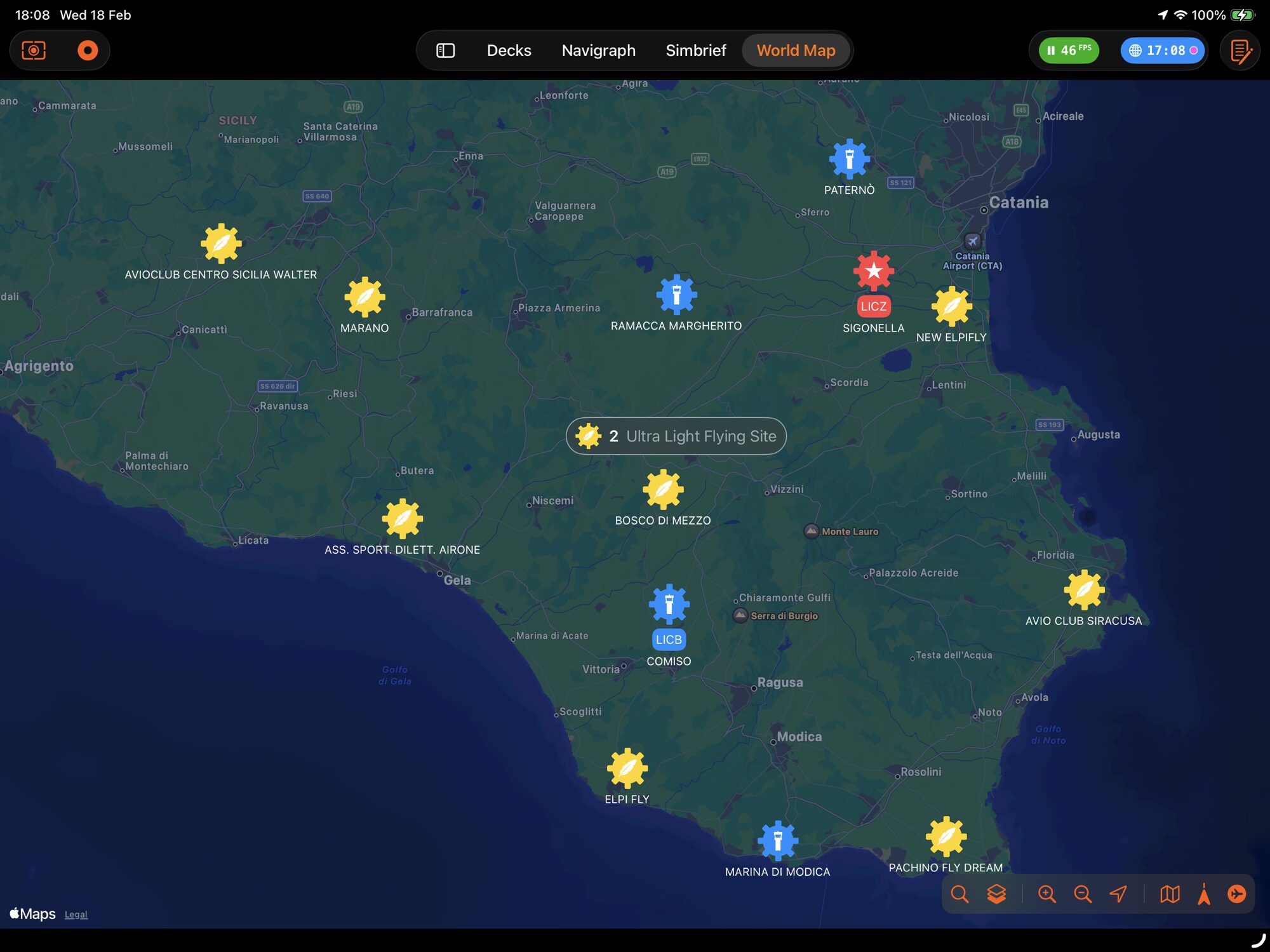
1. World Map — Airport & Navaid Display
The World Map queries OpenAIP to display:
- Airports, color-coded and icon-coded by type (major, minor, military, helipad, seaplane, closed)
- Navaids (VOR, NDB, DME, ILS, Marker, TACAN) with frequency labels
- Co-located navaid badges on airport pins
- Search by ICAO code, IATA code, or airport name
Airports cluster when zoomed out and expand into individual pins when zoomed in. A filter toolbar lets you toggle visibility by airport and navaid type.
2. Flight Logging — Automatic Airport Detection
When a flight is started or ended, the app queries OpenAIP for the nearest airport within 5 km of the aircraft’s current position. This automatically populates the departure and arrival ICAO codes in the logbook entry. If no airport is found, the field is filled with ????.
The same lookup runs periodically while airborne (when position tracking is active) to keep the aircraft’s current location up to date.
3. SimBrief OFP Validation — Origin Airport Matching
When the app auto-fetches a SimBrief OFP after an aircraft change, it uses OpenAIP to resolve the aircraft’s current position to an ICAO code. This is then compared against the OFP’s departure airport to decide whether the plan is valid for the current flight. If they don’t match, the OFP is discarded silently.
World Map Features
Airport pins:
- Color and icon vary by airport type
- Tapping a pin shows a callout with name, ICAO/IATA codes, runway info, elevation, and co-located navaids
Navaid pins:
- Show identifier, type, and frequency
- Displayed separately from airports
Filtering:
- Filter controls let you show or hide airport types and navaid types independently
- Preferences persist across sessions
Search:
- Search bar in the map accepts ICAO codes, IATA codes, and airport names (minimum 4 characters for name search) and even general POI (Points of Interests, like “Grand Canyon”)
- Results are sorted by distance from current map center
SimBrief OFP overlay:
When an OFP is loaded, the World Map also shows (independently of OpenAIP):
- DEP, ARR, and ALTN airport pins
- Named waypoints from the navlog
- A color-coded route polyline (pink for climb/SID, purple for cruise, green for descent with STAR, orange for approach)
How the API Key Works
The API key is set once via OpenAIPClient.apiKey when the app starts and again whenever settings are saved. All calls to the OpenAIP database go through the AirportKit framework, which uses this key for authentication.
The key is stored in plain text in UserDefaults under the key map.credentials.openaip.